
Pinterest Video Downloader

Paste any Pinterest link to watch an instant video preview and download in full HD MP4 with audio. Looking for photos?

Pinterest is full of videos, photos, GIFs, recipes, tutorials, wallpapers, fashion ideas, and other visual content. Sometimes you may want to save a Pin to your device for offline viewing or keep a copy of content you are allowed to use. Our Pinterest Video Downloader lets you process a public Pinterest link directly from your browser.

You can use the downloader to save supported Pinterest videos, images, and GIFs without installing additional software. Copy the Pin URL, paste it into the downloader, and check the available media before saving the file to your device.

How to Download Pinterest Videos in 3 Easy Steps

Follow these simple steps to save high-quality Pinterest videos, reels, and photos directly to your phone or computer.

Copy The Pin Link

Open Pinterest on your app or browser. Find the video you want, tap the Share icon, and select Copy Link.
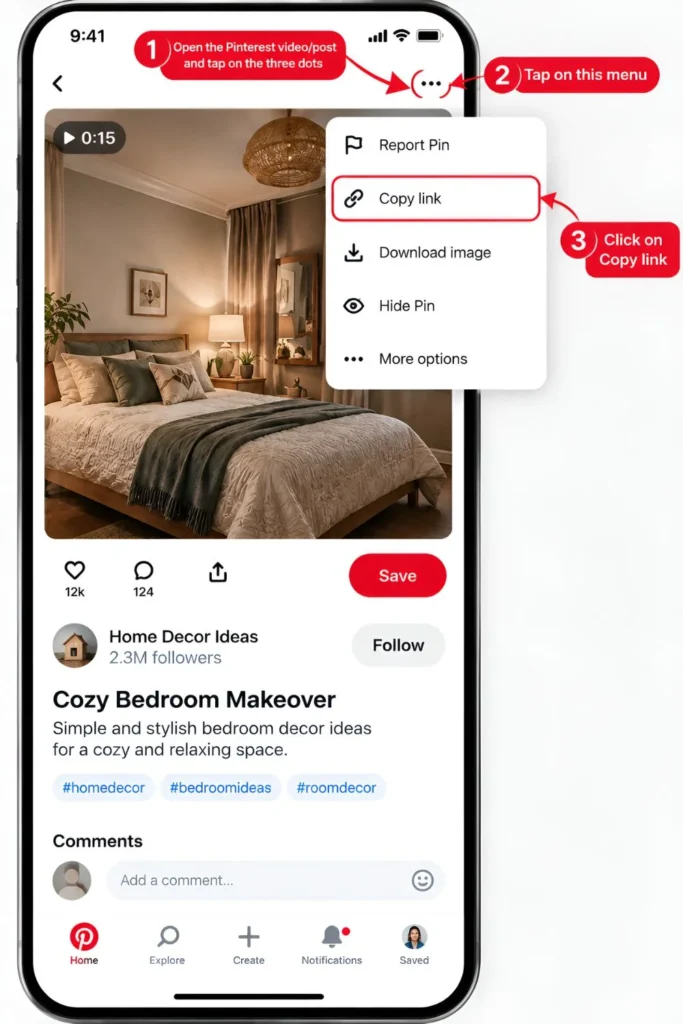
pin url

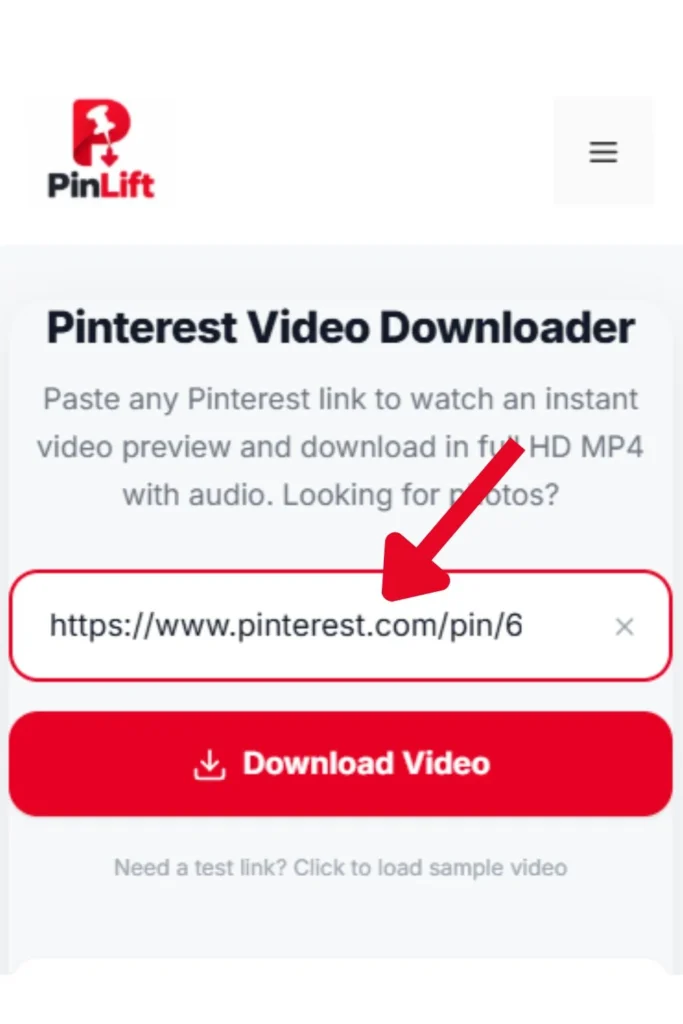
Paste Into Pinlift

Paste your copied Pinterest URL into the input field above and click the red Download Video button to start processing.
Save in Full HD / MP3

Preview your video instantly and pick your desired format: 1080p HD, 720p, 480p, or extract pure MP3 audio.

pin url

What Does the Pinterest Video Downloader Do?

PinLift is a Pinterest downloader online tool for processing publicly accessible Pinterest content. Depending on the Pin, you may be able to download a video, image, GIF, or multiple media files from a supported link.

The basic process is straightforward. You do not need to create an account or install browser extensions. Just copy a Pinterest URL, paste it into the downloader, and check the available download options.

Why Use Our PinLift Service?

Fast Download

Instant parsing of Pinterest CDN streams without annoying delays or redirects.

Multiple Resolutions

Full selection of 1080p Full HD, 720p HD, 480p SD, 360p mobile, and pure MP3 audio.

Live Video Preview

Watch the exact playable video directly on the page to confirm before initiating download.

Mobile Friendly

Seamless experience on iPhone Safari and Android Chrome without app installations.

Simple Clean Interface

Clean, uncluttered layout with zero invasive popups or deceptive advertising.

Privacy Focused

No tracking, no download history stored, and complete client-side security.

How to Download Pinterest Videos on Any Device

Follow these simple steps to save Pinterest videos on your phone, tablet, Windows PC, or Mac.

How to Save Pinterest Videos on iPhone & iPad:

  • 1 Open the Pinterest app, find the video Pin, and tap the Share icon.
  • 2 Tap Copy Link to copy the Pinterest video URL to your clipboard.
  • 3 Open Safari, visit our Pinterest video downloader, paste the link, and tap Download Video.
  • 4 Select your preferred quality, such as 1080p HD. The video will be saved to your Safari Downloads / Files app.

How to Save Pinterest Videos on Android Phones:

  • 1 Open the Pinterest app, find the video Pin, and tap the Share icon.
  • 2 Tap Copy Link to copy the URL to your clipboard.
  • 3 Open Chrome or any browser, paste the link, and tap Download Video.
  • 4 Click Download HD. The file immediately downloads into your device Gallery and Downloads folder.

How to Download Pinterest Videos on Windows PC & Mac:

  • 1 In your browser on Pinterest.com, click the video Pin or copy the browser address bar link.
  • 2 Paste the link into the URL input box above and click Download Video.
  • 3 Choose 1080p HD or MP3. The file will save directly to your computer's Downloads folder.
  • 4 You can right-click the video preview and select Save video as... if desired.
``

All Pinterest Formats Supported

One single tool for every piece of visual media on Pinterest.

MP4 Video

Standard Pin Videos

Up to 1080p 60fps

Reels

Idea Pins & Reels

Full audio preserved

Audio Track

Pinterest MP3 Audio

192kbps clean stereo

Images

GIFs & 4K Photos

Original compressed

GOT QUESTIONS?

Frequently Asked Questions (FAQ)

Everything you need to know about downloading Pinterest videos safely and easily.

Yes, our Pinterest video downloader is completely free with no usage limits. You can download as many Pinterest videos, reels, stories, and MP3 audio tracks as you want without registering or paying any fees.

Open the Pinterest app, tap the Share icon on your desired video and select "Copy Link". Open Safari, visit our downloader, paste the link, and tap "Download Video". When the preview loads, tap your preferred resolution, such as 1080p HD. Safari will ask "Do you want to download?". Tap "Download" and the video will be saved directly in your Safari Downloads / Files app, where you can save it to your Camera Roll.

Yes! Every video downloaded through our tool retains its full original high-definition audio track. In addition, we offer a dedicated "Audio Only (MP3)" option if you only want to save the music or sound from any Pinterest video.

No. All videos are downloaded in their original raw quality direct from Pinterest's media delivery servers without any watermarks, logos, or branding added.

Yes, our downloader fully supports standard Pinterest pin videos, Pinterest Reels, Idea Pins, video stories, animated GIFs, and high-resolution images.

On Windows and Mac, files are saved in your default "Downloads" folder. On Android devices, videos appear in your Gallery app under "Downloads". On iPhone/iPad, files go to Safari's "Files" app / Downloads folder, from where you can tap "Save Video" to move it into your Photos app.

Disclaimer: This tool is not affiliated with, endorsed, or sponsored by Pinterest. We do not host, store, or archive any copyrighted videos or media files on our servers. All videos and files are fetched and delivered directly from Pinterest's Content Delivery Network (CDN). Users are solely responsible for ensuring their use of downloaded media complies with applicable copyright laws and the original creator's intellectual property rights.